---
title: Creating FCI Account
description: If you have a loan with Upright there is a good chance it is being serviced by FCI. Your loan servicer is who invoices you your monthly interest statements, collects payments and makes sure the accoun
---
[Skip to content](https://help.upright.us/en/creating-fci-account-upright-help-center#main-content)
English
Show submenu for translations
![logo\_primary\_white.svg\]](https://help.upright.us/hubfs/logo_primary_white.svg)
Open main navigation
Close main navigation
- English
Show submenu for translations
- Contact us
Contact us
Hello. How can we help you?
- There are no suggestions because the search field is empty.
1. [Help Center](https://help.upright.us/en?hsLang=en)
2. [Borrower Help Center](https://help.upright.us/en/borrower-help-center?hsLang=en)
3. [Loan Payments](https://help.upright.us/en/borrower-help-center?hsLang=en#loan-payments)
# Creating FCI Account
If you have a loan with Upright there is a good chance it is being serviced by FCI. Your loan servicer is who invoices you your monthly interest statements, collects payments and makes sure the accounting of your loan is kept up to date. While some of this information is provided to you on your Upright Dashboard, you'll also want to create a User Account with FCI so you can easily make payments, set up Auto ACH and request payoffs.
We appreciate you keeping your loans current by making your payments on time. This is the best way for us to ensure your project stays on track! The below offers some instruction on how to get your FCI account set up.
For any loans serviced by FCI, you will need to create an account with them at [https://blis.myfci.com/verify/loan/info](https://blis.myfci.com/verify/loan/info). Once you have an account, you can login at [https://blis.myfci.com/login](https://blis.myfci.com/login).
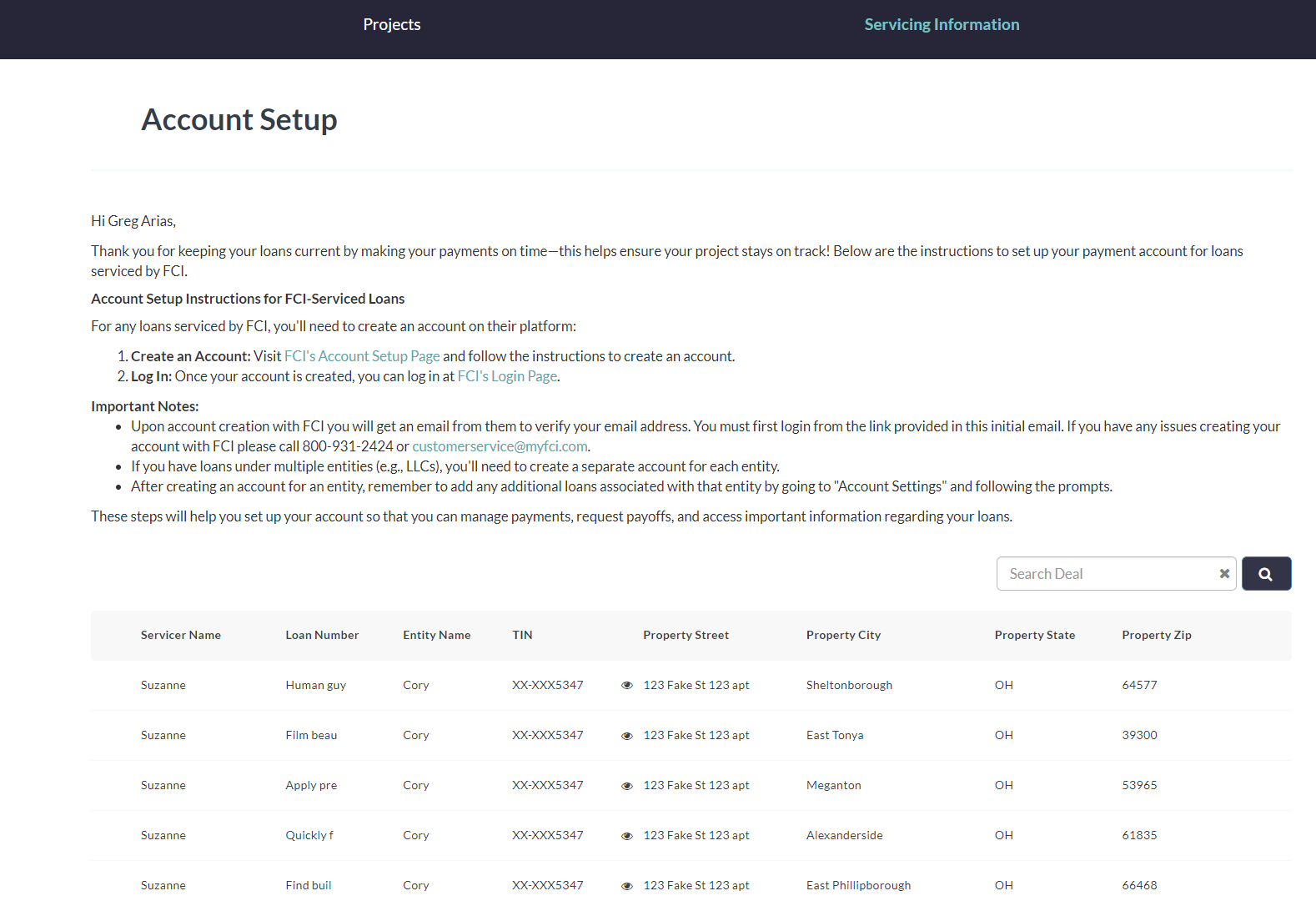
To set up your account with FCI you will need the following information, all of which can now be found on our Upright Dashboard.
- **Loan Number:** This is the FCI servicer ID which you can find on your Upright Dashboard.
- **Borrower Last 4 TIN:** This is the last 4 digits of the borrowing entity TIN or EIN. FCI may present this as SSN but what they really need is your LLCs tax number. The IRS would have sent this to you when you created your entity.
- **Property City:** This is the city for the property that you have the loan on.
- **Property State:** This is the state for the property that you have the loan on.
- **Property Zip:** This is the zip for the property that you have the loan on.
To find all of the above information on your Borrower Dashboard look for the "Servicing Information" link in the blue sub-header. From here you'll see all of the information you need to get your account set-up with FCI.
[](https://downloads.intercomcdn.com/i/o/1177021255/f7e6aa8bba8d1f8d8884fadd/image.png?expires=1734980400&signature=70461b0d5991856e55b80e324190c647abb516ad734a6093088889af32589f1c&req=dSEgEcl8nINaXPMW1HO4zZHOIXCO0KhtUabUNP96w%2BGvikRYnCLCOq5L372D%0AxUotOT5QLw1jb43X2v8%3D%0A)
If you have loans in multiple entities (i.e. LLCs) you will need to create an account for each entity. You can sort by Entity Name on the Servicing Information page on your dashboard to see if you'll need to set up more than one account with FCI.
Once you’ve created an account for the entity, you will need to add any additional loans you have with this entity to this account by going to “Account Settings” and following the prompts once you're logged into FCI. Be sure to use the above Servicing Information to help you get all of your loans associated with your account.
Be sure to get your FCI account set up or new loans added to your account so you can make payments, request payoffs and have access to other important information regarding your loans.
- [Borrower Help Center](https://help.upright.us/en/borrower-help-center?hsLang=en#main-content)
- [Loan Payments](https://help.upright.us/en/borrower-help-center?hsLang=en#loan-payments)
- [Construction Draws](https://help.upright.us/en/borrower-help-center?hsLang=en#construction-draws)
- [Extensions](https://help.upright.us/en/borrower-help-center?hsLang=en#extensions)
- [Payoffs](https://help.upright.us/en/borrower-help-center?hsLang=en#payoffs)
- [General Info](https://help.upright.us/en/borrower-help-center?hsLang=en#general-info)
- [Investor Help Center](https://help.upright.us/en/investor-help-center?hsLang=en#main-content)
- [PFNF Updates](https://help.upright.us/en/investor-help-center?hsLang=en#pfnf-updates)
[](https://upright.us/)
Help Center
Copyright © 2026, Upright